
Workflow tasks are accessed and managed from the left sidebar of the new DocuWare client as before and can also be opened using links sent in notification emails. The notification mail link opens the new DocuWare client when the organization administrator has set the default client to new DocuWare.
There are two task processing modes available:
The Side Panel processes a task in a collapsible panel alongside the task list, allowing users to keep context and switch between tasks easily.
The Details Page opens the task in a full-page view for focused work. Access the tasks' documents with a fully functional document viewer, for example, to edit index entries or place annotations, and search for text in the document while having your task form open. The Viewer size is adjustable using a slider, and both the size and zoom level are remembered across sessions.
Task actions menu
Open the workflow task list in table view or card view. In table view, you can sort and filter tasks by column. In card view, unread tasks are additionally marked with a red dot in front of the task title, so you can see at a glance which tasks are new.

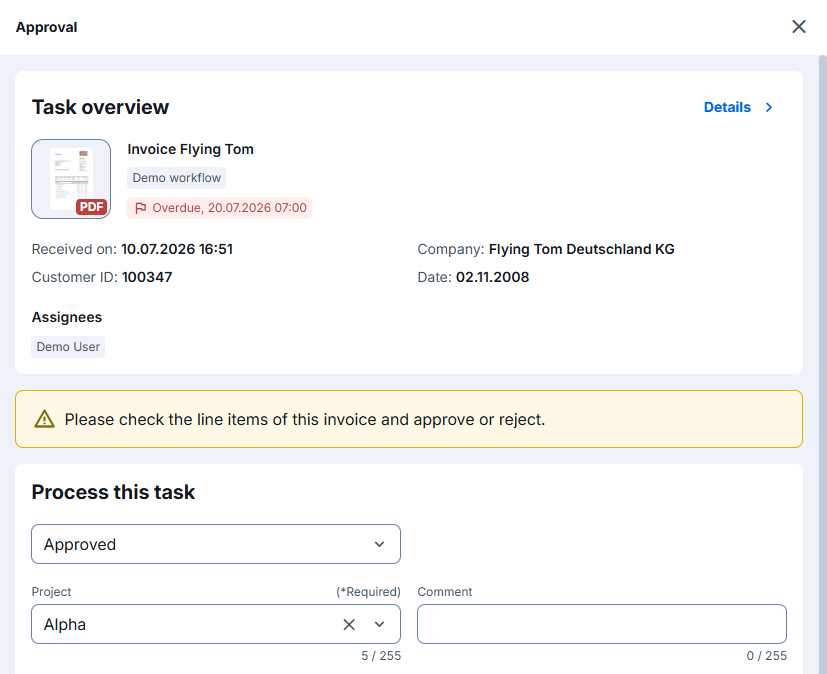
The instructions for a task are shown in a yellow info box between the task overview and Process this task, so you can read them before filling in the task form.
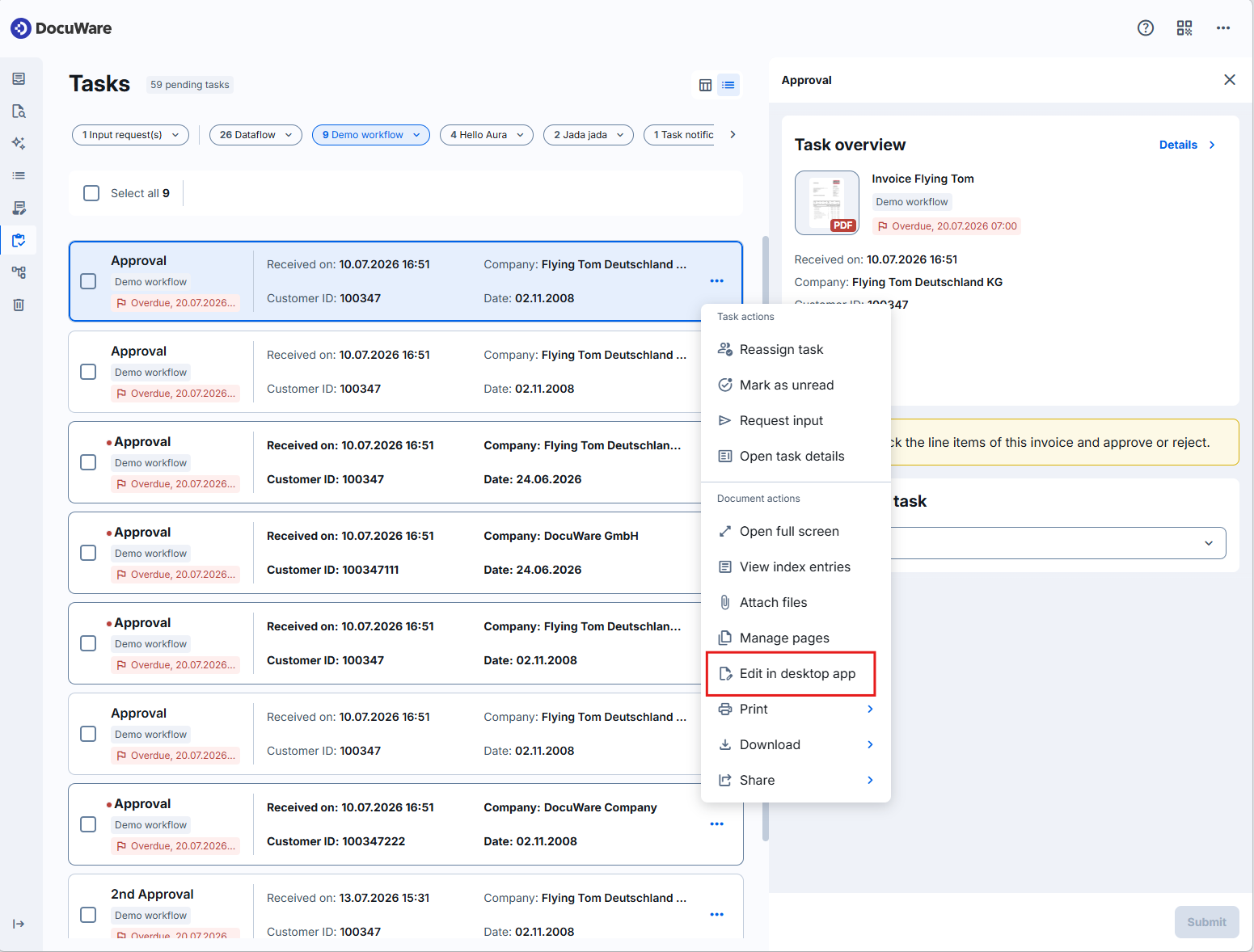
To access task and document functions, use the three-dot menu or right-click a task. The menu includes the following options:
Reassign task
Mark as unread
Request input
Open task details
Open full screen
View index entries
Attach files
Manage pages
Edit in
Print
Download
Share
The previous Send request option has been renamed to Request input. A new Attach files action opens the document in the Viewer with the Attached Files panel displayed, so you can start attaching documents immediately.
The new Manage pages option opens the task document in the Viewer with the Pages panel already active, so you can rotate, reorder, or delete pages before you make your decision. The entry is shown only when the task’s document is a PDF.
Use the Edit in option to edit a task’s document directly from the task list, without opening it in the Viewer first. For Microsoft Office files, Edit in opens a submenu with two options: Edit in Microsoft 365 in the web opens the file in the matching Microsoft 365 online application, and Edit in desktop app opens the file in the local application. For all other file types, Edit in starts the desktop app directly. The Edit in desktop app option requires DocuWare Desktop Apps to be installed on your computer. Edit in Microsoft 365 in the web requires online editing of Office files to be enabled for your organization and a Microsoft 365 Business license.
Current limitation
Tasks are currently not locked in the new DocuWare, so it can happen that multiple users are processing a shared task at the same time.
Quick start tips
Double click to open the adjustable Viewer, and use functions such as editing the index entries or placing annotations:
.png)
Right-click a task, or open its three-dot menu to visualize the options:
Viewing task history
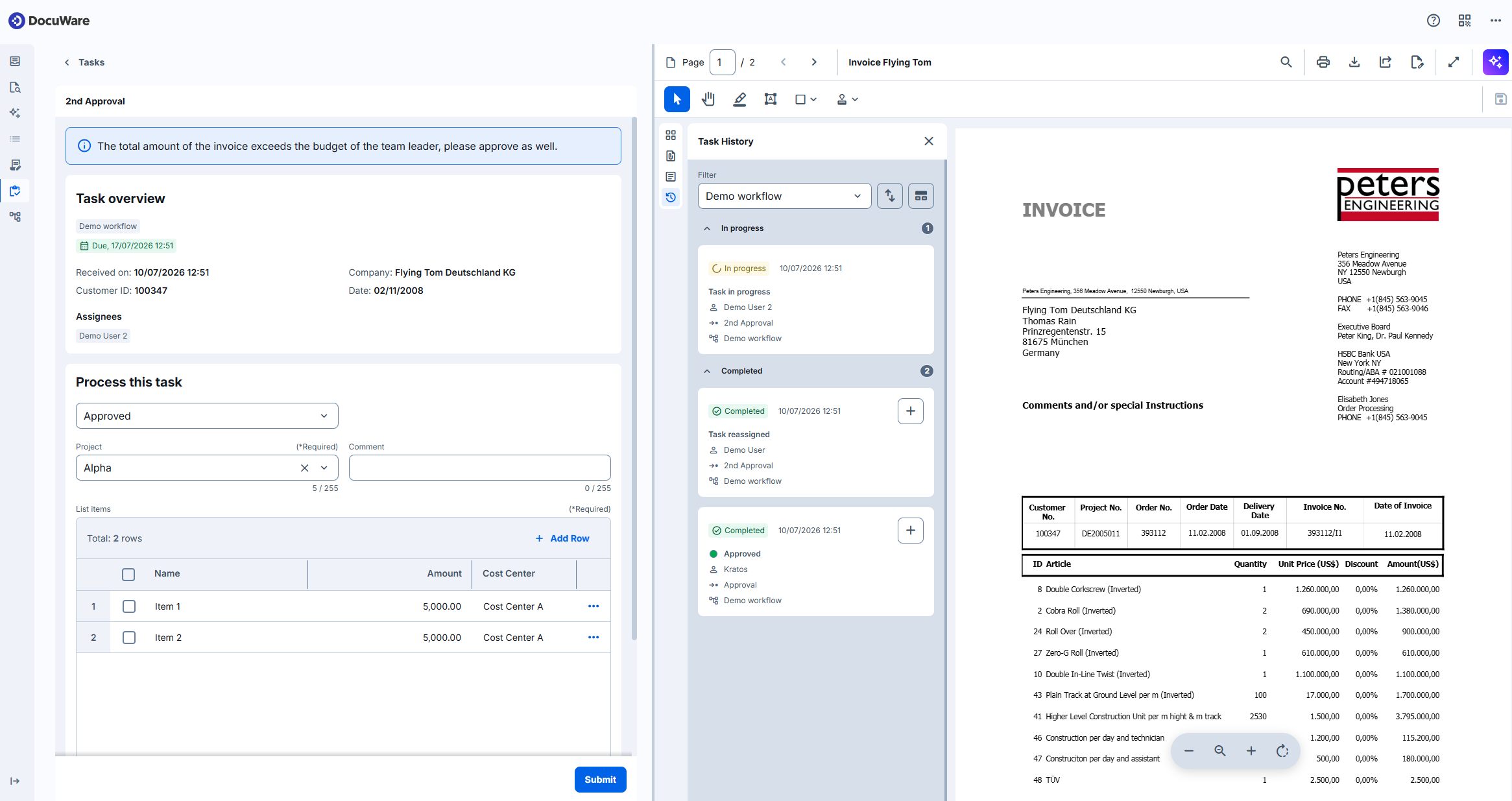
Task history opens in the Viewer and shows the decisions and entered data in task fields. You can see who acted, when, which decision was made, and which field values were entered. The feature replaces the decision history from the classic DocuWare client. No configuration is required; task history is available to users by default.
A document can be handled by more than one workflow, for example, a duplicate check and, later, an invoice approval. When you open the task history for a task, it shows only the steps in the workflow the task belongs to. To see the steps from another workflow the document went through, change the filter to that workflow, or show all workflows.
Task history lists manual steps only. It does not show automatic steps that the workflow runs on its own, such as assigning data, sending emails, or calling another service.
By default, steps are sorted newest first. You can change the sort order or group the steps by workflow or by status.
Quick start tip
Each previous action appears as a card with the task name, workflow, assigned user(s), timestamp, decision, and a state badge (In progress or Completed). Empty fields are not shown. Reassigned tasks and stopped instances appear as labeled as Task reassigned and Instance stopped.
Monitoring workflows in Workflow Overview
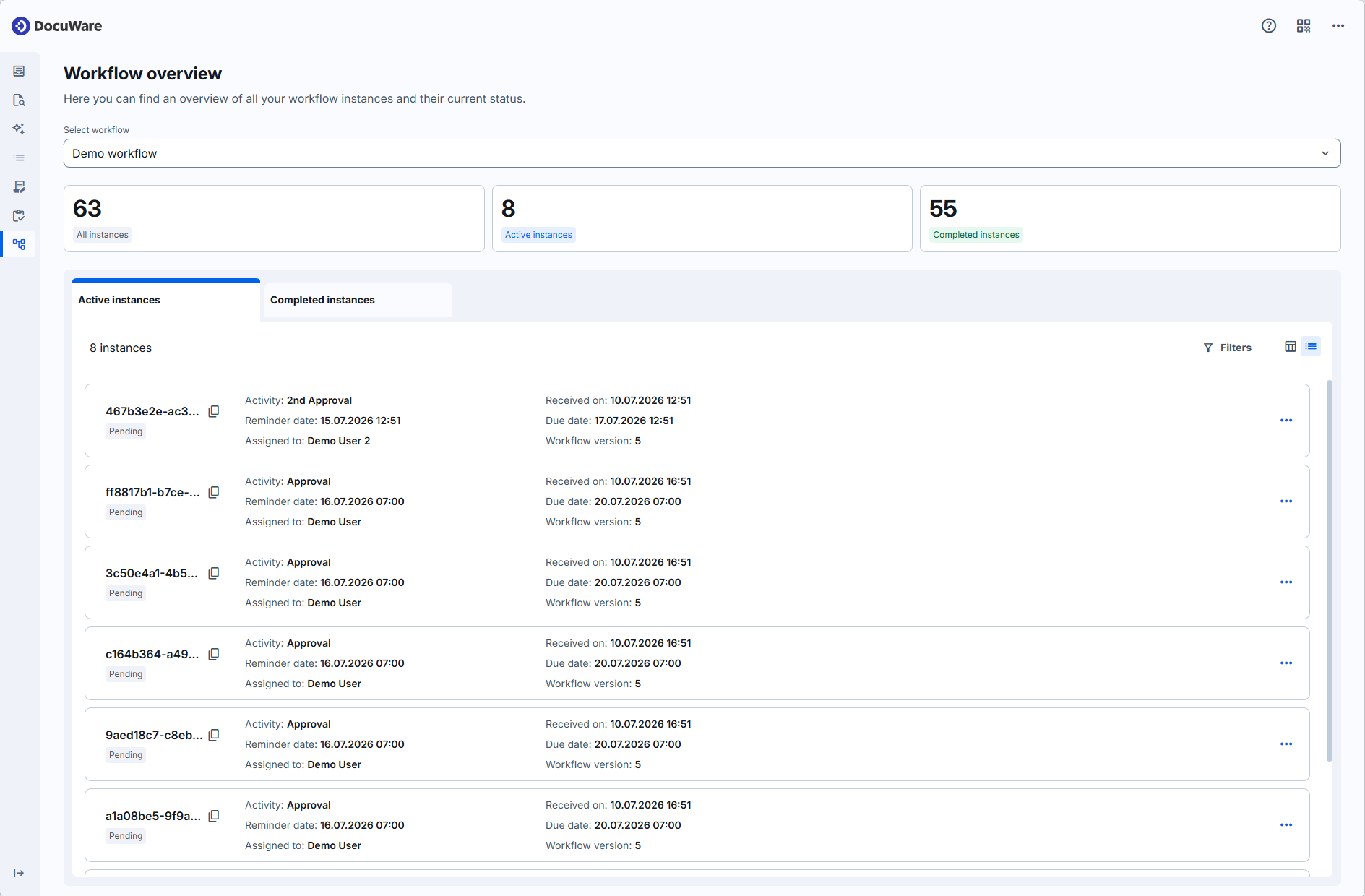
Workflow Overview lists the running instances of your workflows in one place, so you can check their status without opening the related documents first. Open it from the main navigation of the new DocuWare client under Workflow Overview. You can show the instances in a card view or a table view, the same two views you know from the task list.
The instance data is shown only to users who hold the Workflow Designer or Controller role for at least one workflow. A user without either role can open the overview but sees no instances.
Each instance shows its system variables, plus the workflow version, the instance ID, and the instance status. The overview also shows the count of active and finished instances. The status shows what an instance is waiting for:
Pending – waiting for a task to be completed.
Waiting – waiting for a document to be stored or changed.
Error – waiting for someone to resolve a general, uncaught error.
From the overview you can filter instances by status, open the related document, and end an instance that is stuck or no longer needed. Open an instance to read its full Instance history – for example, to see which step stopped an instance in Error and what data was entered before it. Instance history is the new name for what was previously called Workflow history.
Current limitation
The overview shows active instances only. Access to finished instances and additional filtering options are planned for a later release.
Quick start tips
Running instances of workflows shown in card view:
Running instances of workflows shown in table view:
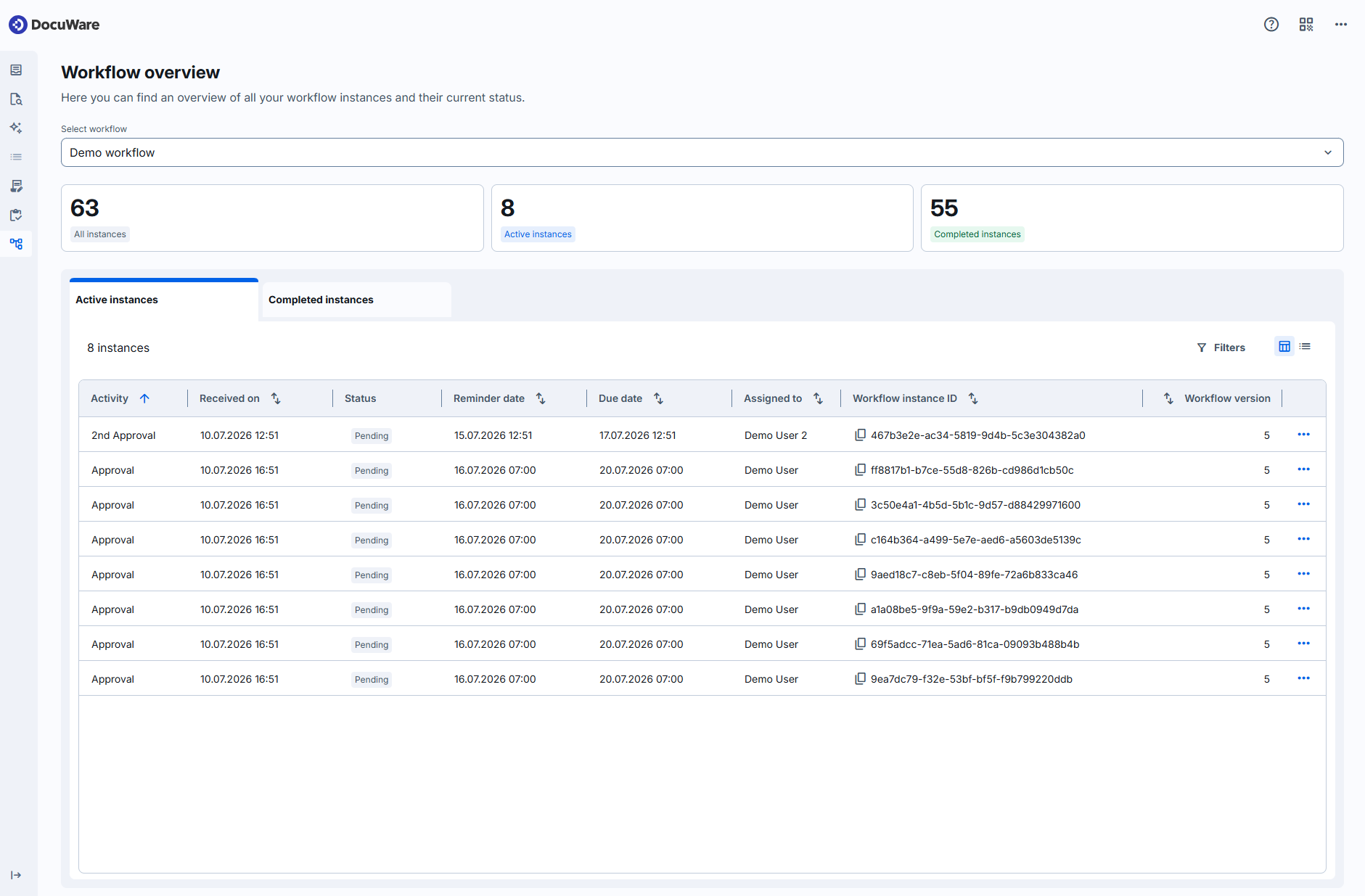
Workflow designer filters:
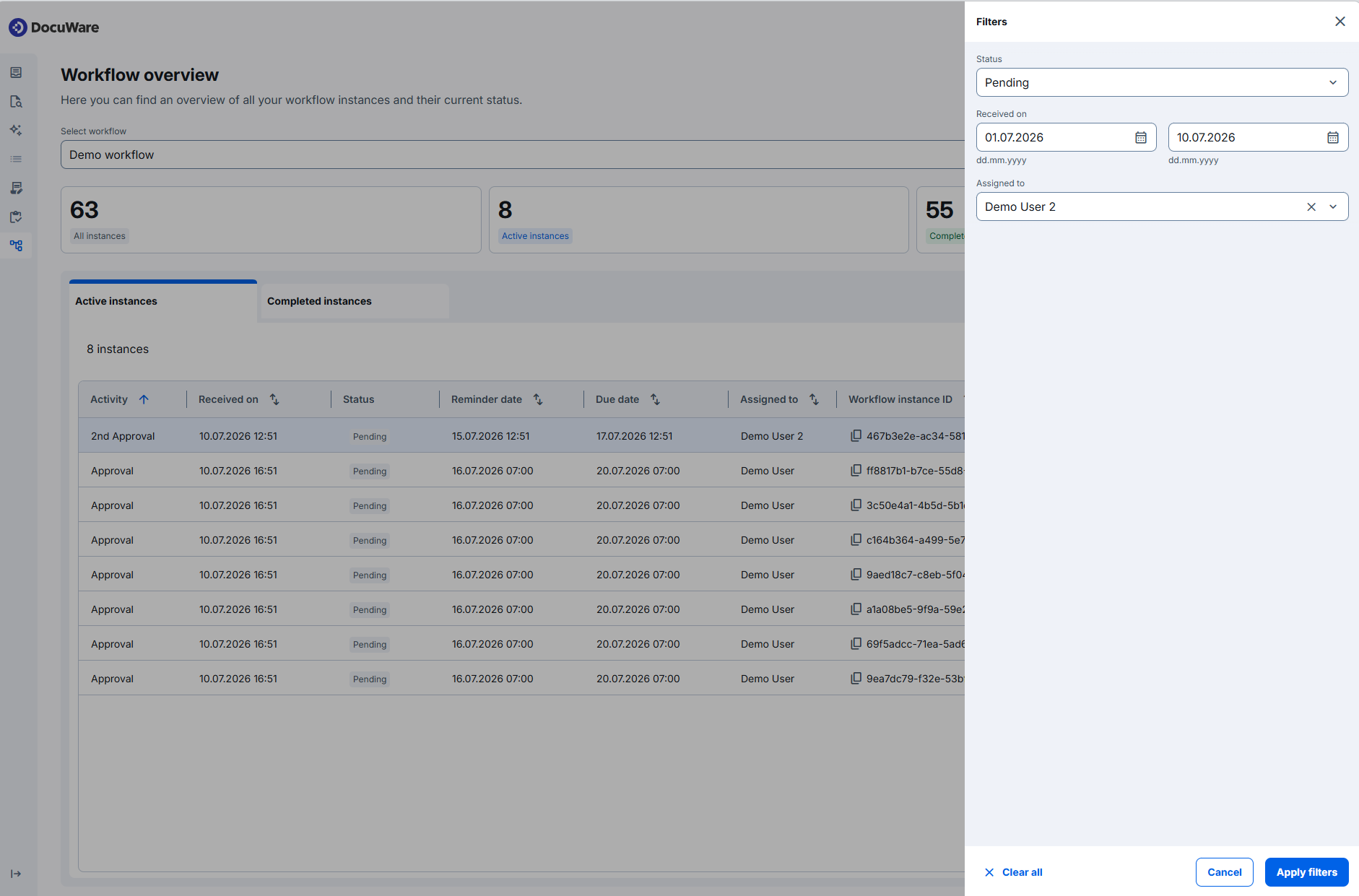
Workflow instances data:

Accessing forms
Forms can be accessed from the left sidebar of the new DocuWare client. The forms list now allows wildcard searches on form titles. Forms can also be pinned, keeping frequently used entries at the top for quick access.