In addition to the date, the version overview and the workflow details now show the publishing time of each workflow version, to the second. Until now, only a date was shown, so versions published on the same day could not be told apart.
Component: Web-based Workflow Designer
Applications
A workflow was published twice in one morning. The process owner uses the publishing timestamps to identify which version was live when a specific invoice entered the process.
Benefits
Same-day versions can be told apart when you investigate a case
You see whether a change is only saved or already live
Here's how
The workflow details show Last edited by and Created by with the full date and time.
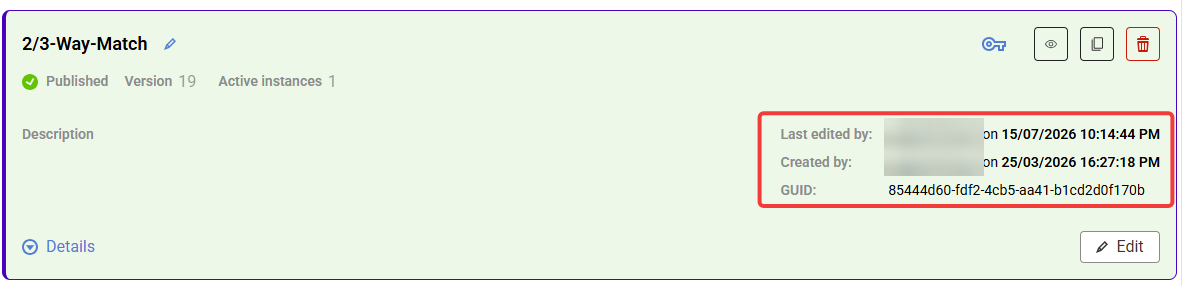
The workflow details, with date and time to the second.
In the version overview, every earlier version shows Published on with its date and time, in list view and in grid view. Active and waiting instances show date and time for Active since as well.
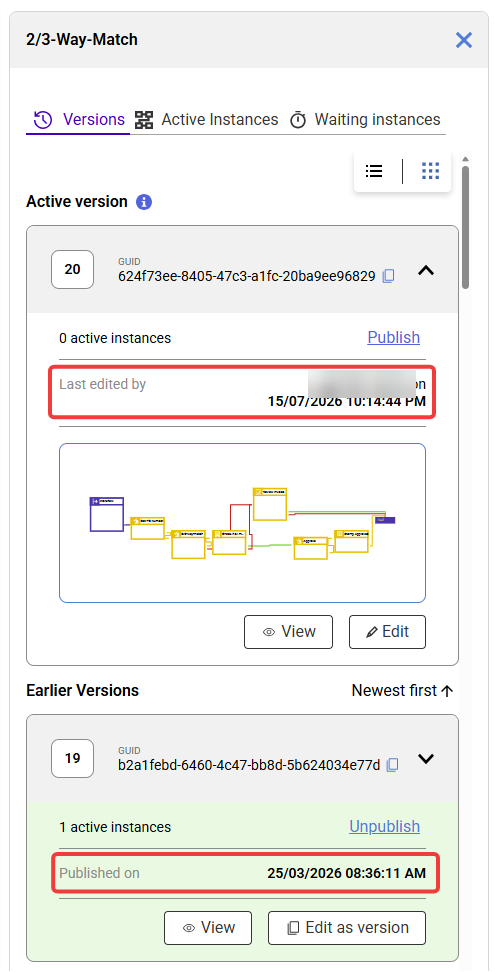
The version overview: each version carries its own publishing timestamp.
Versions published before DocuWare 7.15 show their publishing date and time too, so the version history is complete. Date and time follow the time zone and the regional settings of the logged-in DocuWare user.