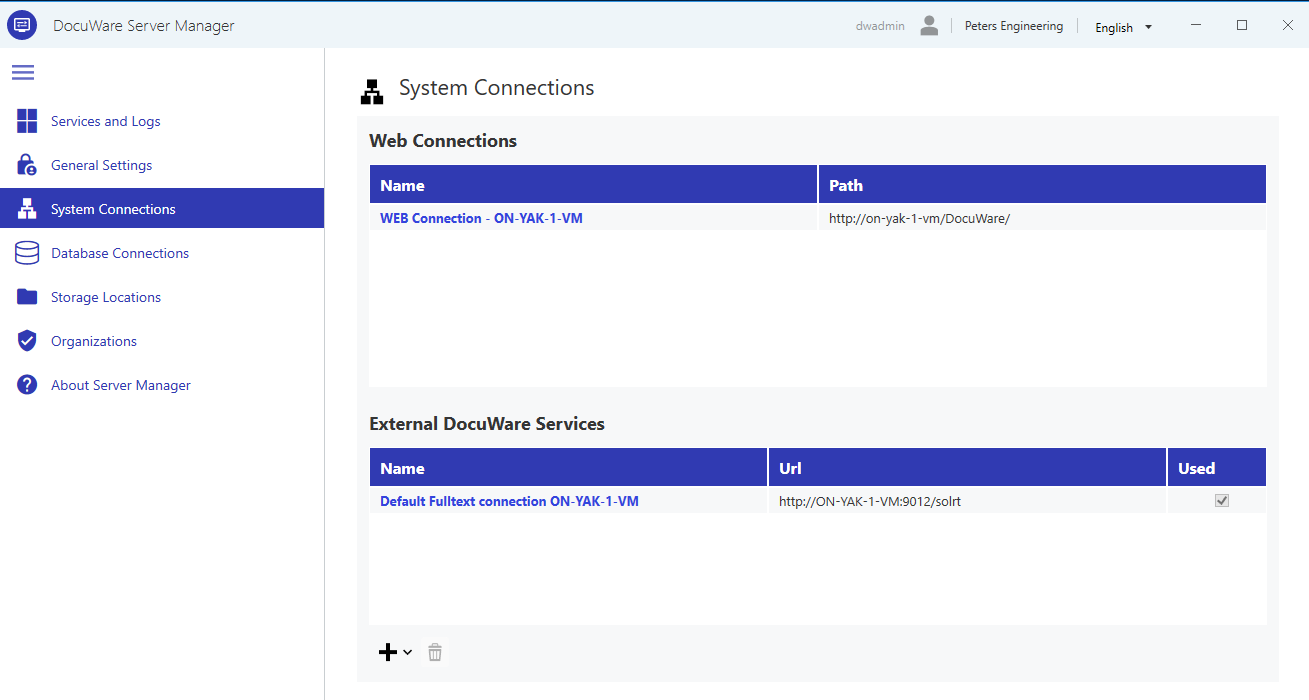
The System Connections page in DocuWare Server Manager defines how your DocuWare system communicates.
System connections include:
Web connections: they specify how users using client applications such as Web Client or Mobile reach DocuWare web components.
External DocuWare Services: they define how this DocuWare server connects to optional DocuWare modules such as Fulltext server or Intelligent Indexing.
Web Connections
Web connections define the URLs under which DocuWare web components can be reached. During setup, DocuWare automatically creates a default web connection which is based on the server name. A single-server installation typically needs only this one connection.
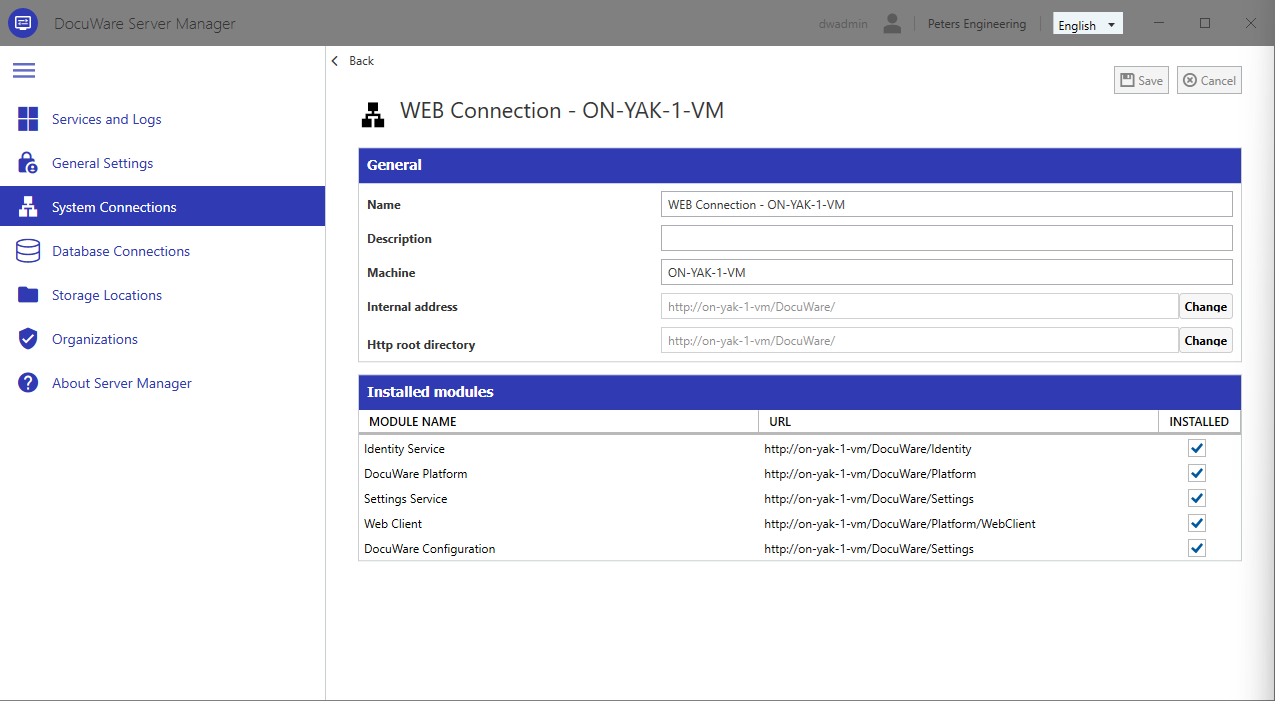
Name: A unique internal identifier for this web connection. Not visible to end users.
Description: Optional. A free-text note for your own reference, only displayed on this page.
Machine: The machine name of the computer on which the web components are installed.
Internal address: The IP address or host name of the server machine. DocuWare setup automatically inserts the correct value.
HTTP root directory: The address of the HTTP root directory, automatically configured during DocuWare server setup.
Installed modules: Lists the DocuWare modules available through this web connection. Select or deselect modules to control which components are accessible via this connection.
External DocuWare Services
The DocuWare server can connect to DocuWare services running on the same or on external machines. Here, the DocuWare server acts as a client that calls these services via their own URLs and ports. Two types of external service connections are supported: Fulltext connections and Intelligent Indexing connections.
Fulltext connections
DocuWare provides fulltext search for documents through a dedicated fulltext server based on the Apache Solr search platform. Each fulltext server requires its own connection entry so the DocuWare system can communicate with it.
During installation, a connection named "Default Fulltext connection" is created automatically. For most single-server installations, this is sufficient.
You may need additional fulltext connections in the following cases:
You have multiple organizations and want to use a separate fulltext server per organization.
You have very large file cabinets and want to distribute the fulltext load across multiple servers. Each file cabinet can only be assigned to a single Fulltext server.
Before you add a Fulltext connection, you need to install an additional Fulltext server. There can only be one Fulltext server per machine. As a single file cabinet cannot be distributed across multiple Fulltext servers, load balancing Fulltext servers is not possible.
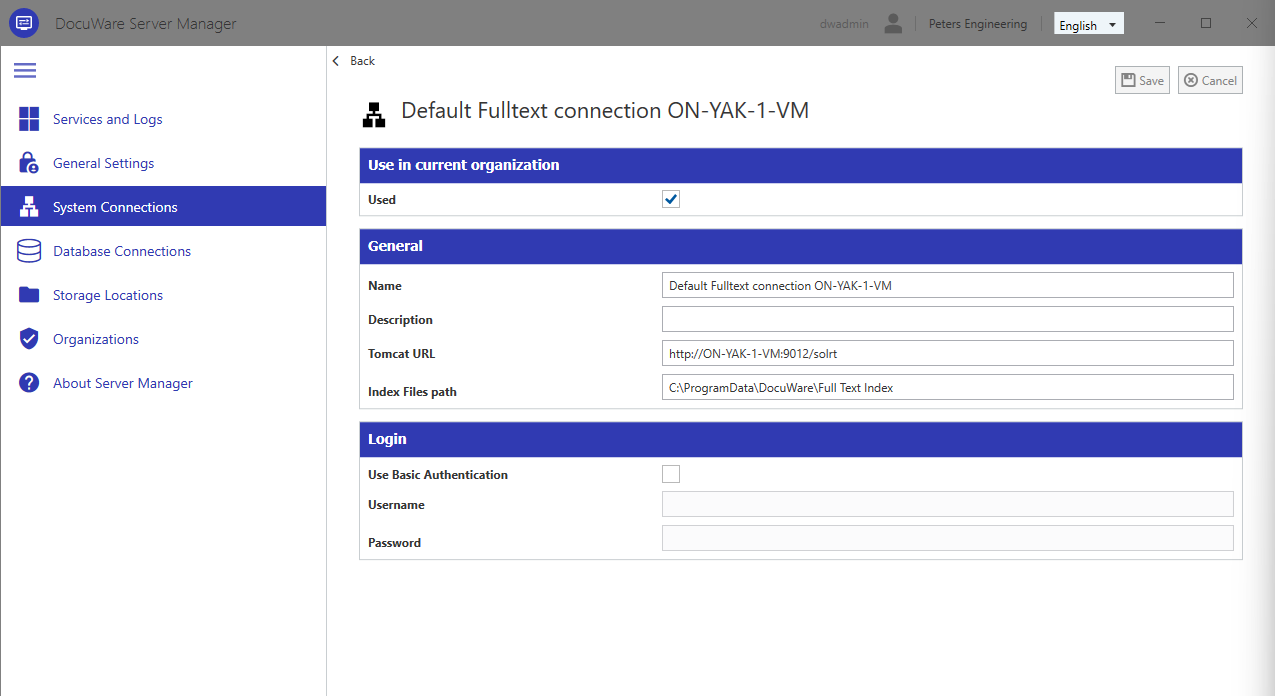
Each fulltext connection has the following settings:
Name: A unique identifier for this fulltext connection.
Description: Optional. Useful to document the purpose of this connection if you have multiple fulltext servers. Maximum 255 characters.
Tomcat URL: The URL to the fulltext server. The URL consists of the host name, port, and the Solr path, for example:
http://hostname:9012/solrt. DocuWare setup inserts the correct value automatically.Index Files path: A directory that is located on the machine running the fulltext server. The fulltext index files will be stored here. Each file cabinet has its own subdirectory.
We do not recommend to change the Index Files path once it has been populated with data, as this might require additional changes in the file system.Use Basic Authentication: Enable this option to secure access to the fulltext server with credentials. By default, this is not enabled.
Username: Only required if basic authentication is enabled.
Password: Only required if basic authentication is enabled.
Intelligent Indexing connections
Intelligent Indexing is a licensed service that automatically extracts index data from documents. The license includes an XML configuration file that contains the connection settings.
.png)
To create a new Intelligent Indexing connection, click the plus sign in the External DocuWare Services table and select Intelligent Indexing. In the dialog that opens, select the XML file provided with your license and click Open. The connection detail page appears with all settings preconfigured. You can change the name and description; all other values are defined by the license file.