The General Settings page in DocuWare Server Manager contains multiple options, such as system administrator permissions, licensing, storage paths, and security properties. The system storage path and the and COLD directory apply to all organizations in an installation, the other configurations are for one specific organization only.
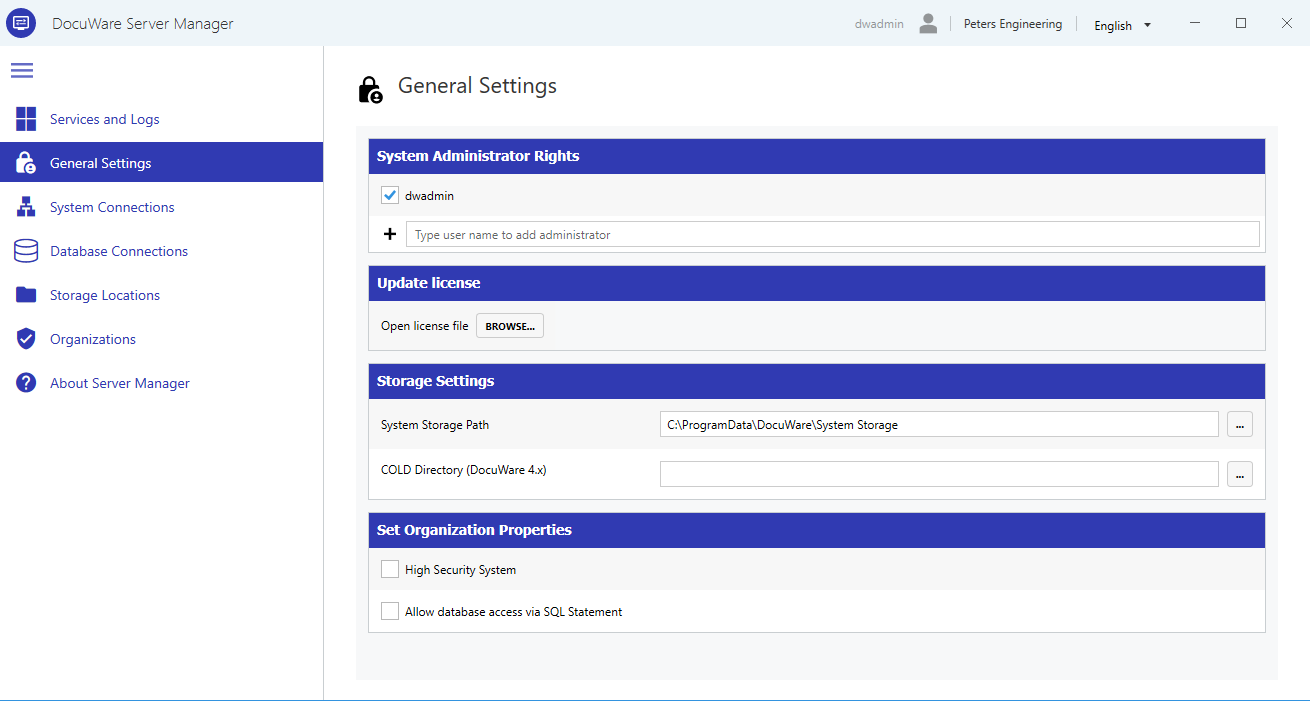
System Administrator Rights
System administrators configure system-wide settings, manage organizations, and access all areas of Server Manager. Every DocuWare organization needs to have at least one user with system administrator rights.
To grant system administrator rights, type a user name in the search field and select the user. To revoke the rights, uncheck the checkbox next to the user's name and click Save. You cannot remove your own system administrator rights.
During installation, DocuWare automatically creates several user types:
System administrator: The technical manager of the entire installation. The system administrator defines settings and configurations across all organizations. Additional system administrators can be assigned here.
Organization administrator: Manages users, groups, roles, and permissions within a single organization. Organization administrators are assigned in DocuWare Configurations > User Management.
Basic user: A standard user without administrative privileges.
Any user who creates a file cabinet automatically becomes the owner of that file cabinet.
Update license
Upload a new DocuWare license file to update the license for this DocuWare organization.
Updating licenses will terminate all client connections. If there are clients connected to this organization, these connections will be lost and clients have to be restarted.
To view your current license configuration, go to Docuware Configurations > Organization Settings > Product overview.
Storage Settings
Storage settings define the file system paths where DocuWare stores system data.
System Storage Path: The directory where DocuWare stores configuration data and temporary files that are required for both the DocuWare system and the DocuWare organization. The default path is
C:\ProgramData\DocuWare\System Storage.
We do not recommend to change the system storage path once it has been populated with data. If you change the system storage path, make sure that the DocuWare services user (default is “DWServices”) has full control of the new directory, and copy all files and directories from the old to the new path.COLD Directory (DocuWare 4.x): Path to COLD data imported from a legacy DocuWare 4.x system. This field is only relevant if you migrated from DocuWare 4.x and use COLD documents. You can ignore it if this does not apply to your installation.
Set Organization Properties
These properties apply to all organizations in the system.
High Security System: This option is only available in DocuWare systems with an Enterprise license. Activating it turns the DocuWare organizations into high security systems.
Important: Enabling High Security System is irreversible
Once activated, the high security setting cannot be reverted, and the following rules will permanently apply to the organization.
When activated, the following rules apply to all organizations:
Users and file cabinets have an optional additional property “high security”.
Only users with the high security property can access high security file cabinets.
File cabinet profiles for high security file cabinets must be assigned directly to users, not through roles. This prevents unintended access through group or role membership.
High security users cannot log on using trusted login, because trusted login delegates authentication to an external system outside DocuWare's control.
Allow database access via SQL Statement: When enabled, users can write custom SQL queries in several DocuWare components, including deletion policies, Transfer-jobs, Autoindex-jobs, file cabinet profiles, result lists, select lists, and workflows. Disabling this option does not remove existing SQL queries, they continue to work, but prevents creating new ones. Custom SQL queries can cause significant database load and allow far-reaching data manipulation.