The new IDP configuration is part of new DocuWare, the integrated platform for intelligent document work. All settings for Intelligent Document Processing (IDP) are now in one place: the processing of your incoming documents, the AI agents that do the work, and the overview of your IDP contracts and consumption.
Until now, an IDP setup was spread over several places. In the new configuration you drag the steps you need onto a canvas, for example, splitting, classification and master data matching, connect them and publish. Each step is configured next to the canvas, so the whole path of a document and the details of every step stay in one view: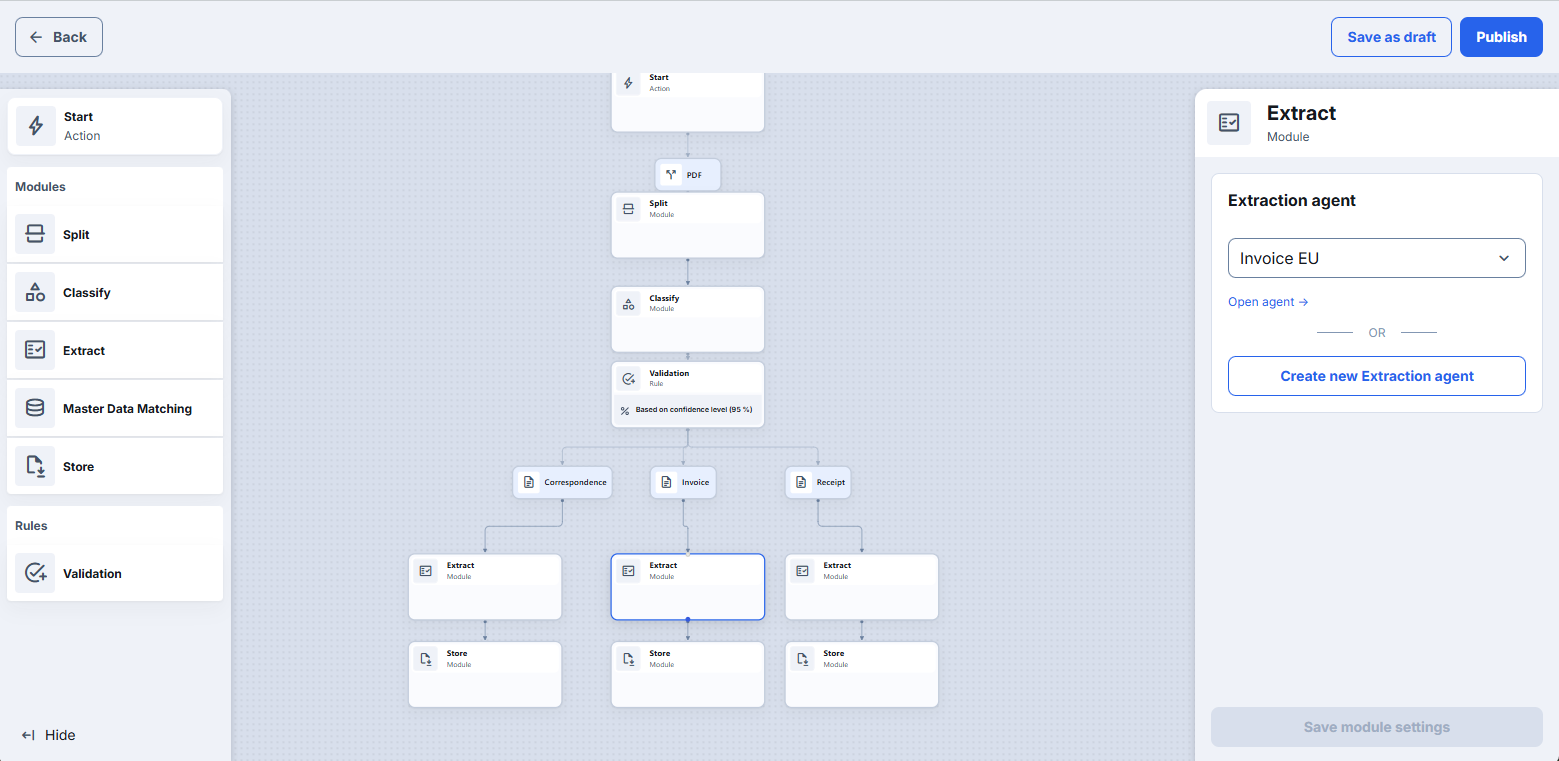
The new configuration is available as Early Access for now, so you can test it. Your previous IDP configurations keep working in parallel, and nothing changes for the processes that run today - see also the "Here’s how” section below.
Components: DocuWare Configurations, DocuWare IDP, DocuWare Cloud
Applications
Incoming invoices at Peters Engineering are splitted classified and extracted by IDP. As an administrator, you build the processing flow and create the AI agent that reads the values out of the invoices all in the same place.
A new document type is set up from beginning to end in one single place: an agent for splitting the scan batch, an agent for the extraction, the matching against master data and the storage. The agents are trained with documents from a DocuWare file cabinet or with other documents.
Benefits
One configuration in one place: processing, AI agents and consumption overview
Visual setup: see the whole path of a document at a glance
Simple UI and high flexibility allows you to set up all of your IDP processes without any other tool
Here's how
In DocuWare Configurations you now find two entries under Capture: IDP and Early Access New IDP.
IDP is the configuration you have used so far, and it stays unchanged.
Early Access New IDP is the new one.
Both are available, so you decide where you set up a process.
Early Access: try it out
Early Access means this configuration is not final and covers a part of what IDP can do. What it already shows is how much simpler an IDP setup becomes: a straightforward document type is set up in one place.
So pick a document type you process regularly and build it once in the new configuration. You see what each module does, you get familiar with the way IDP will be set up in future, and your existing configurations keep running while you try.
A New IDP configuration starts with the intake, the entry point that defines which document formats are processed. The documents are handed over by a client (e.g. via Desktop), so a configuration does not start on its own yet. The automatic monitoring of email folders will follow in a later step.
AI agents the process the document in multiple steps: a splitting agent decides where a scan batch is separated, a classification agent decides which document class/document type a document belongs to and an extraction agent which values are read out of a document. In the module you select an agent that already exists or create a new one, and you train it with your own documents.
You can also create an agent based on your file cabinet data. So no manual definitions and training is needed. The fields are already known to DocuWare, so no index mapping is needed when the document is stored.
In the validation module you decide where the AI results are used without manual checks and and where you want a person to double check the results. Values below the confidence threshold you define become a validation task, which is completed in the classic DocuWare client. (New Client will receive this functionality in October). You can define if Validation is needed for each step in your IDP flow.
What Early Access New IDP offers today:
Building a configuration visually, by dragging modules onto the canvas and connecting them
Manual intake as the entry point, with the document formats you select
Splitting of scan batches, classification of document types and extraction of index values, with OCR as part of the agents
Master data matching of extracted values against your own master data, including fuzzy matching
Validation of values below your confidence threshold, with basic settings
AI agents in DocuWare: overview, creation, training and annotation, including training with documents from your file cabinets
Storage in a file cabinet with DocuWare Desktop, and without index mapping for agents based on file cabinet data
Overview of your IDP contracts and consumption in DocuWare
What is not part of Early Access yet and follows with the coming updates:
Automated intake, so that processing starts on its own when documents arrive
Separate settings for OCR and preprocessing, such as cropping, rotation, language and handwriting, set once for the whole configuration
Separating documents that arrive bundled, for example an email with its attachments or a ZIP file
Processing of e-invoices and of emails
Storage with modules other than DocuWare Desktop, and support for table fields
Several splitting and classification steps in one configuration, complex branching and process logic, fallbacks and detailed error handling
Permissions for the configuration and for validation
Regular updates
New DocuWare and the new IDP configuration grow with regular updates. The list above is the state of today, and it gets longer with every update.