A dialog field of the type user can now show people by their real name instead of their login name. You choose the format per field: login name, first name and last name, or last name and first name. The field still stores the login name, so existing workflows, stored data, and integrations are not affected.
Component: Web-based Workflow Designer
Application
At Peters Engineering, IT creates login names such as "CAS0123". The workflow author sets the field to first name and last name, so a new colleague in purchasing selects "Elizabeth Cash" instead of working out which login name belongs to her.
Benefits
People pick the right colleague without knowing the login-name convention
Nothing changes in stored data or integrations, because the login name is still what is saved
Here's how
You set the format in the dialog configuration of a task activity and publish the workflow.
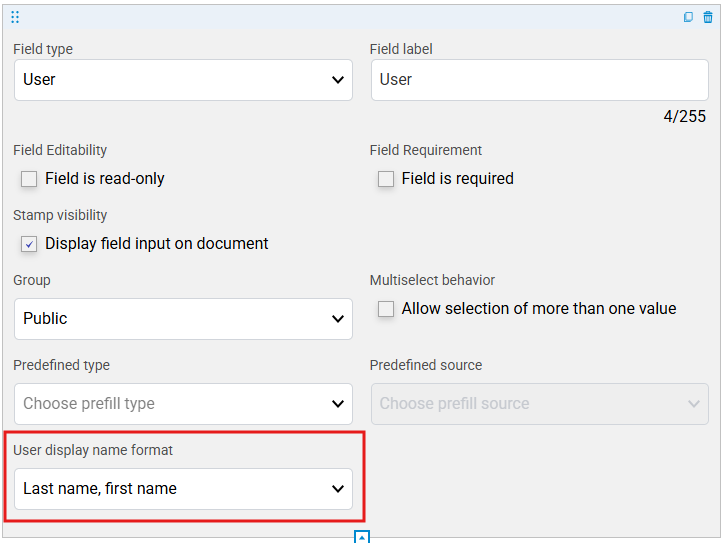
The setting User display name format on a user-type field, in the dialog configuration of a task activity.
Real names appear where a first name and a last name are stored in user management. Where they are missing, the field shows the login name. When several users share the same first and last name, the login name is added in brackets, for example Elizabeth Cash (ecash2).
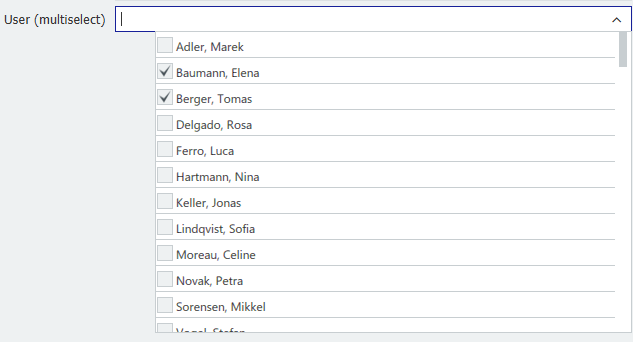
What the person filling in the task sees: the user picker in the task dialog.
In this release, the format is used in classic DocuWare and on the workflow stamp. In new DocuWare and in the workflow history, login names are still shown.