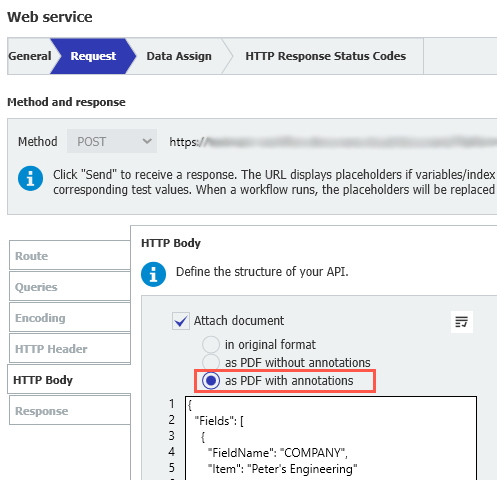
When integrating a REST web service into a workflow, you can attach the document as part of the web service request. Now, there is a new option for this: you can send the document as a PDF with annotations. Previously, you could only send the original document or a PDF without annotations.
Components: Web-based Workflow Designer, Workflow Designer Desktop App
Applications
If integrating with DocuWare is not an option, send a complete document, including additional information from stamps and further annotations, to another system via their API to save it there.
Update such a complete document in another system via their API.
Benefit
Enhanced automatic document exchange between systems or services
Here's how
Add a web service activity to your workflow and select either a REST web service or a predefined endpoint, such as the DocuWare Platform API.
Select an endpoint that sends data (POST or PUT).
In the Request body, select Send document and then PDF with annotations.