DocuWare Aura answers questions about documents in the new DocuWare Client. Users open the chat with the Aura icon.
As an organization administrator, you configure DocuWare Aura under DocuWare Configurations > Aura. You define the file cabinets, and the documents within them, that DocuWare Aura indexes. This matters when a user asks a question without selecting any documents: DocuWare Aura then searches for matching documents itself and finds only the ones indexed here.
The DocuWare Aura configuration never widens access to the documents at any point. Existing permissions for documents and index fields continue to apply to every user, and documents do not leave the DocuWare servers. The White Paper AI-based data processing with DocuWare (in English language) describes the processing in detail.
For now, DocuWare Aura requires DocuWare Cloud and the new Web Client.
Enabling DocuWare Aura
The setting Enable Aura for my organization is the prerequisite for indexing file cabinets. Questions about selected documents do not need it: in the Viewer and in a result list, DocuWare Aura works for every user of the new DocuWare Client.
You accept the terms and conditions below the setting. Users are not asked to accept anything when they open DocuWare Aura. Enabling alone indexes no documents. Which documents are indexed depends on the file cabinet selection described below.
When you switch the setting off again, DocuWare Aura can no longer search file cabinets. Questions in the Viewer and in a result list remain available.
Selecting documents for Aura
DocuWare Aura finds a document on its own only after it has indexed it. Two settings define which documents these are, and how many:
File cabinet: The file cabinets DocuWare Aura indexes. When DocuWare Aura searches for documents itself, it uses documents from these file cabinets only.
Storage time period: How far back DocuWare Aura indexes in a file cabinet. The period is a rolling one, counted from the current date, so a document leaves the indexed set as soon as it falls outside the period. Select one of the fixed periods, from the last 3 months to the last 5 years, or All for the complete file cabinet.
The list shows each selected file cabinet with its storage time period and the number of documents it contributes, plus the total against the included volume. The Freemium package includes 5,000 documents per organization. Saving is refused when the selection exceeds this number.
The indexed set stays within the included volume on its own. When a file cabinet grows beyond it through normal storing, DocuWare Aura keeps the most recent documents and drops the oldest ones from its scope. Before you save, check that the documents users will ask about lie within the periods you set.
Documents without text recognition, and documents with a corrupt text shot, cannot be indexed. DocuWare Aura does not use them for an answer.
After saving, a progress bar shows how far indexing has advanced. For a few thousand documents this takes a few seconds. DocuWare Aura finds documents from a file cabinet as soon as it has finished indexing that file cabinet.
Indexing then continues on its own. A newly stored document is indexed within seconds. A document that is deleted, or that leaves the selection with its file cabinet, is removed from the index immediately.
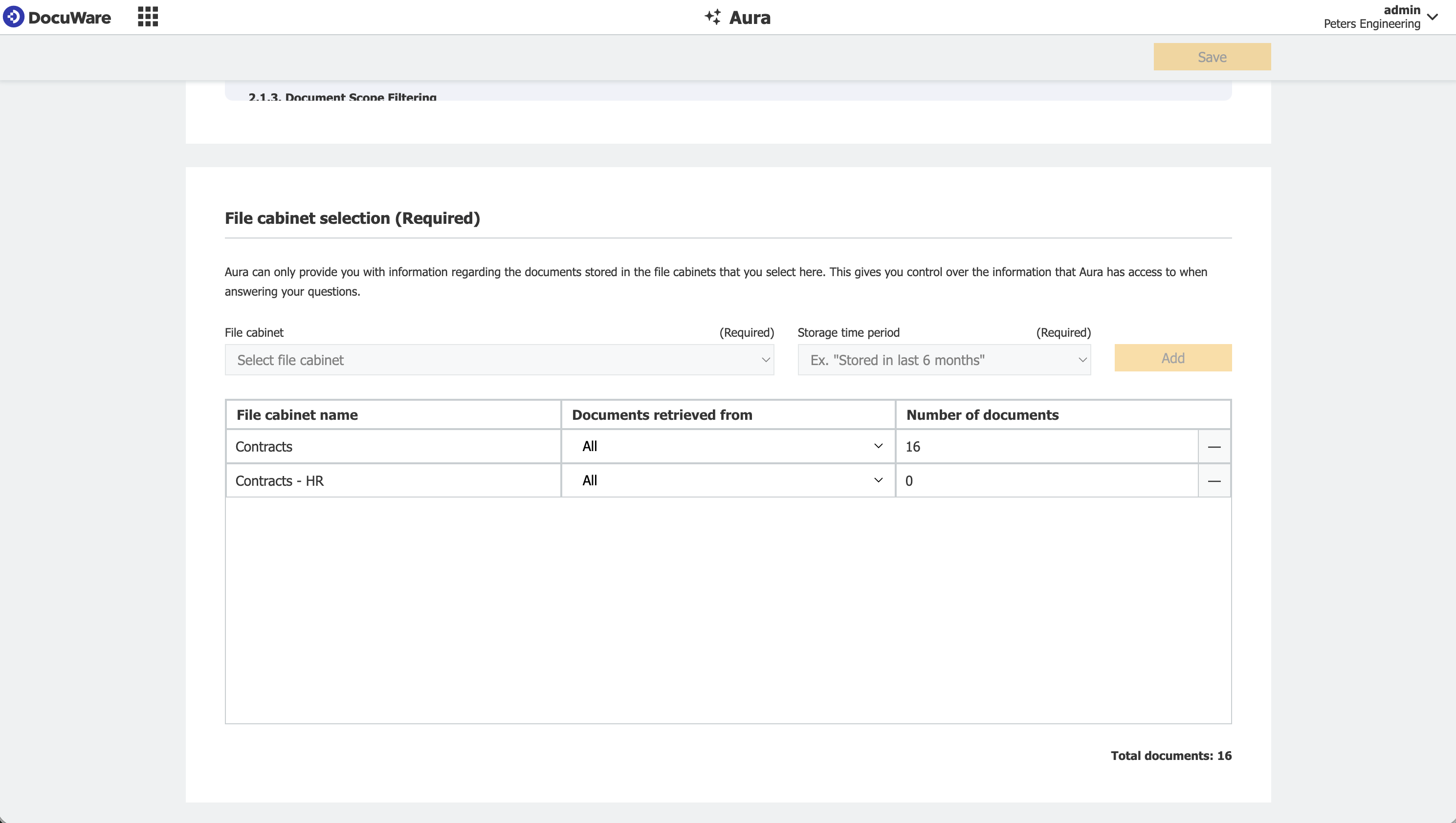
Each selected file cabinet shows its storage time period and the number of documents it contributes.
A deliberate selection has two effects. It keeps the organization within the included volume, and it keeps answers relevant, because DocuWare Aura searches a defined set of documents instead of the complete archive.
Volume and usage
In the Freemium package, every DocuWare Cloud organization has an included volume for DocuWare Aura. Questions in the Viewer and in result lists therefore work as soon as users have the new DocuWare Client. For the documents that DocuWare Aura indexes, 5,000 per organization are included.
Questions are counted in Aura Credits, which the organization shares. The daily volume resets at midnight of the server location, and the current usage is shown in this configuration. Users see a note in DocuWare Aura when the daily volume is nearly used up, and further questions are blocked once it is used up.
Additional capacity can be added at any time. Your DocuWare contact provides information on the available options.
What users see
In the Viewer and in a result list, DocuWare Aura is available to every user of the new DocuWare Client, independently of this configuration. The Viewer always holds one document. In a result list, users select up to 15 documents at a time.
In the left sidebar, users ask their question without selecting documents first. DocuWare Aura answers from the file cabinets it has indexed, so the indexed documents are the limit here. Users can restrict a question to individual file cabinets, and every answer names the documents it is based on, so users can open them and check the result.
For details on working with DocuWare Aura, see DocuWare Aura in new Web Client.