The DocuWare Server architecture is divided into three tiers:
Frontend services: A part of the application logic is found in several services of the frontend role.
Backend services: Another part of the application logic is found in several services of the backend role.
Infrastructure (storage locations, databases, fulltext functionality, message bus): In principle, several servers share common resources on one or more central background servers.
The frontend and backend roles are installed with DocuWare setup.
The three layers of the DocuWare system architecture communicate with the client applications via the frontend services. All dialog-oriented functions run in the browsers of the workstation systems and mobile devices used in the client applications..
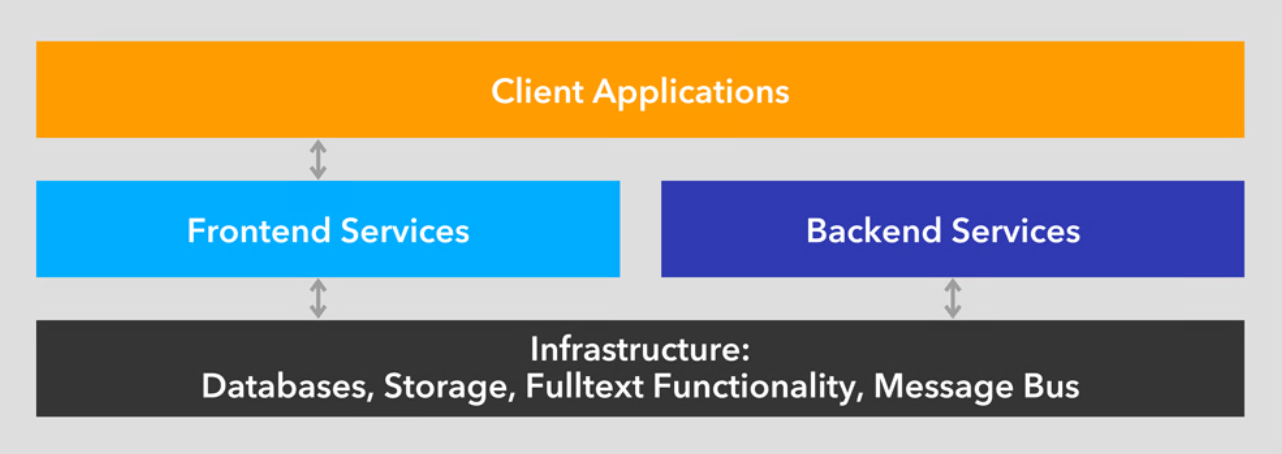
DocuWare’s three-tier architecture
The term server here refers to a software service, not to a piece of hardware. A DocuWare system therefore invariably consists of several (software) servers, all of which can – as a minimal solution – simultaneously run on one hardware system.
DocuWare uses the latest technologies in programming and designing its system architecture.
DocuWare works on a browser, to use its Web client, you just need an internet-capable device with a browser. Therefore you can use DocuWare across all platforms: The system can be called up on Windows, Mac OS and Linux devices. Only in a few cases are local Windows applications needed; these are brought together in DocuWare Desktop Apps, which can easily be managed centrally.
The DocuWare Web Client is based on HTML5 technology and thus supports all standard browsers, even for highly complex operating scenarios.
DocuWare works with open communication standards and uses HTTPS between the components, mostly either based on the REST (Representational State Transfer) or SOAP (Simple Object Access Protocol) technology.
The mobile applications of DocuWare are available in iOS and Android, and thus on all key platforms. To install DocuWare, the latest Windows versions are always supported and for the databases MS SQL and MySQL.
DocuWare Cloud and DocuWare as an on-premises solution are based on the same code, so both solutions offer an almost identical range of functions. On-premises customers also benefit from technological enhancements for DocuWare Cloud, for example in performance, stability and scalability.
System requirements overview
DocuWare relies on sustainable technologies and the greatest possible compatibility between the system and a wide range of different hardware and software components from other manufacturers. System requirements are therefore adapted with each new version. This section gives you an initial overview. For the most recent details, also regarding possible limitations, see System Requirements in the DocuWare Knowledge Center.
Web Client: DocuWare supports the latest versions of Firefox, Chrome and Edge Chromium browsers.
DocuWare servers: The servers of the DocuWare system are implemented on the basis of Microsoft's .NET architecture. They can therefore be run on all platforms that support a common version of Windows.
Infrastructure components: For databases, DocuWare supports the latest versions of Microsoft SQL Server and MySQL.
Terminal Server: The Microsoft Terminal Server and Citrix Metaframe can be used as extensions of the DocuWare system. However, the DocuWare Desktop Apps are not intended for use on a terminal server by default. In order to be able to use the Desktop Apps remotely on a terminal server, you have to make manual settings for each terminal server. You can find more information here.
Use of the DocuWare Desktop Apps as remote apps is not supported.
This overview of our client applications, frontend and backend services will help you to understand how they work:
Client applications
The DocuWare system includes three types of client applications:
Web-based applications
The web-based applications include DocuWare Web Client and DocuWare Configuration:
Web Client: The Web Client or DocuWare Client allows users to access the DocuWare system without having to install a client application.
The Web Client offers all the possibilities of modern document management and workflow automation. You can store and search the documents in a file cabinet (among other places) and display and edit them in the DocuWare viewer.
Furthermore, you can handle all your document-based processes in automated workflows, for example your invoice approval process.The feature set of the Web Client has more functions – such as the workflow task list or the Task Manager – depending on the modules, which can be licensed in addition to the standard DocuWare features.
The Web Client is based on HTML5 technology. The component is integrated in the Platform Service, which it uses to communicate with backend servers.
The Web Client uses the Desktop Service to communicate with the components of the DocuWare Desktop Apps.
Configuration: DocuWare Configuration consolidates the configuration interfaces of the applications, also called modules, within a DocuWare system. The applications are based on HTML5.
The DocuWare Configuration technically consists of two components: the user interface with the application components and the Settings Service for saving the settings.
In each configuration module, you can create, edit and delete configurations and assign permissions for the configurations to other users.
Windows-based applications
Windows-based applications in the DocuWare system include DocuWare Desktops Apps, the Client Setup and DocuWare Update as well as DocuWare Request.
DocuWare Desktop Apps: DocuWare Desktop Apps comprise all DocuWare applications that are installed locally on the client computer.
The DocuWare Desktop Apps are installed via Client Setup. The user selects individual apps or the entire package for installation.
When an app is installed, the DocuWare Desktop Apps dialog is installed in the Windows tray.
This dialog serves two purposes:
Access to the user interface of the DocuWare Scan, DocuWare Import and Smart Connect applications. All other Desktop Apps come with their own user interface (e.g. Connect to Outlook) or run in the background (e.g. Edit & Send or Printer).
Connection of the locally installed DocuWare Desktop Apps to the DocuWare system
How the desktop application processes are embedded in the DocuWare architecture is illustrated in the following figure: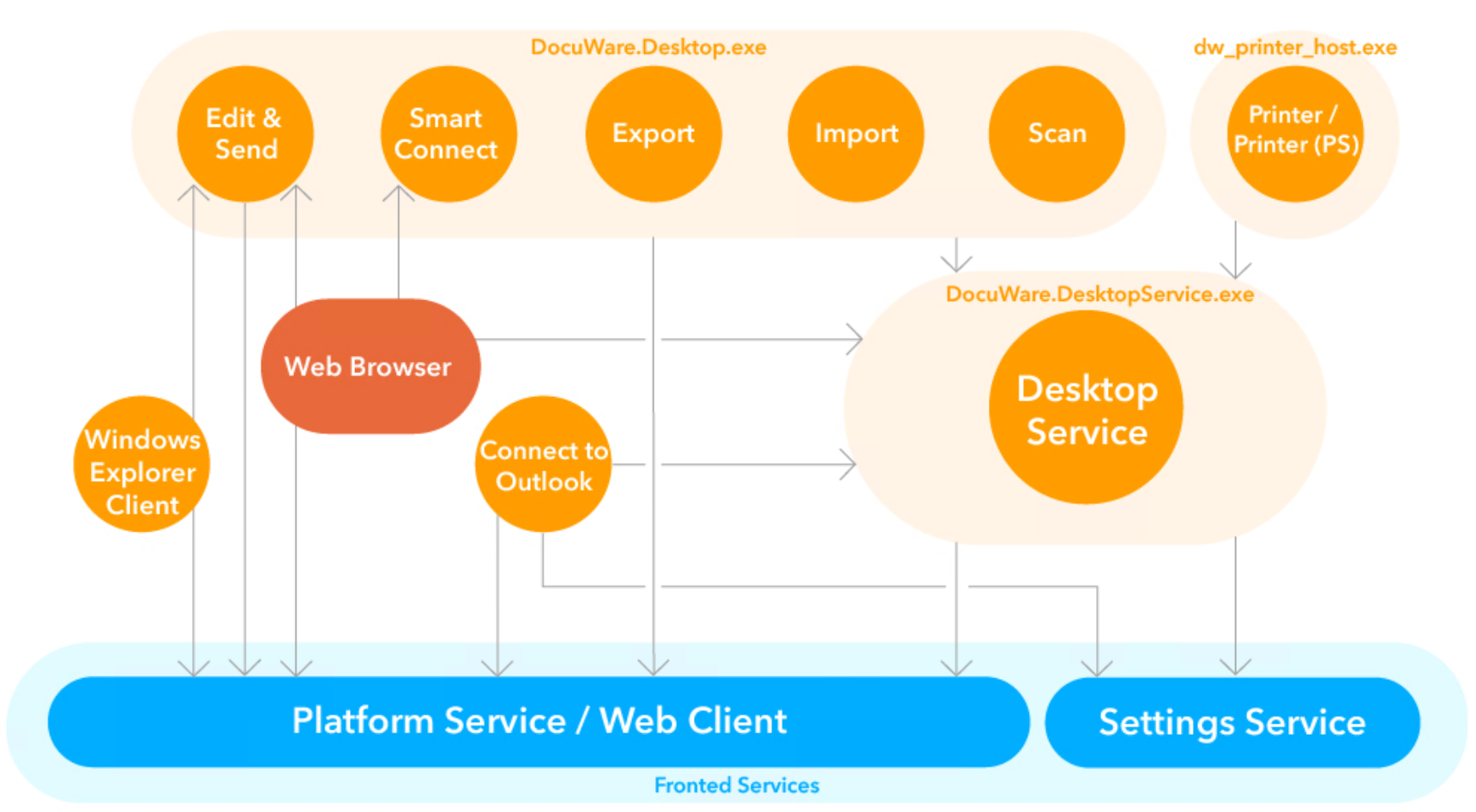
Certain Desktop Apps communicate directly with the Platform Service through the Platform.NET API, and others also access the Desktop Service.
Desktop Service is installed with the Client setup as part of the Desktop. It is required for operating DocuWare Desktop Apps.
The service runs once on each computer connected to a DocuWare installation and establishes the connection between DocuWare Desktop Apps and DocuWare servers. The service serves as host for various local services and allows them to access interfaces.
The Desktop Service retrieves the processing configurations for importing, processing, and storing documents in DocuWare from the Settings Service.
The Desktop Service transfers the documents to the Platform Service for storage in the file cabinet. The fulltext generated by the DocuWare Desktop Apps is also stored at the storage location by the Desktop Server using the Platform Service..
More information about further windows-based applications
Client Setup
DocuWare Update
Mobile client applications
With the DocuWare App for iOS or Android, you can access DocuWare from your mobile device.
Frontend Services
The DocuWare Frontend Services are based largely on the Internet Information Services (IIS), a service platform by Microsoft. This allows the services to be easily operated with TLS/SSL encryption by adjusting the IIS configuration.
The following sections provide information about the components associated with the DocuWare Web Servers. Load balancing is possible for all three services.
Platform Service and Web Client
The Platform Service is automatically installed during setup and can be accessed in the Internet Information Services (IIS) on the used Web Server under the address https://<Servername>/DocuWare/Platform. It enables uniform access for all clients and to any device. This works both with DocuWare applications and with third-party applications based on the DocuWare .NET SDK.
The Platform Service accesses the Authentication Server and the databases directly.
By using HTTPS and the modern architectural style Representational State Transfer (REST), the Platform Service is extremely efficient and acts as a uniform interface for very different connections. Resources are embedded into the third-party application through XML or JSON. The Platform Service contains an overview of the available resources and documentation about how to use them. An annotated XML Schema Definition (XSD) is attached to all data formats, from which documentation is automatically created and which is always up-to-date. Thanks to XSD, libraries to simplify programming can be automatically created for various target platforms. The libraries can easily be updated to ensure that data formats remain up to date. DocuWare provides a .NET API on NuGet for .NET developers to guarantee user-friendliness.
You can also directly log into a DocuWare system from the Platform Service in order to see information such as search dialog IDs or file cabinet GUIDs. URI templates for integrating resources also save the developer time.
Applications that use the Platform Service are also compatible with future versions of DocuWare. This means that when DocuWare is upgraded to a new version, client applications do not necessarily have to be updated.
The Platform Service supports a diverse array of procedures which speed up HTTP-based web applications. HTTP caching methods bring a significant increase in speed across many scenarios. The platform also supports transparent compression and works behind proxies.
For more information, see the DocuWare Developer Documentation.
Web Client: Web Client, which provides DocuWare's graphic user interface for working with documents (see also the section Web Client in the chapter "Client Applications"), is integrated in the Platform Service.
The Web Client can be accessed under the address https://<Server name>/DocuWare/Platform/WebClient and uses the same services provided by the Platform Service.
Workflows for Workflow Manager: This platform service processes for Workflow Manager the data that is generated by user interaction in DocuWare Client, for example inputs like confirmation of tasks.
Settings Service
The Settings Service provides access to most DocuWare system settings. The DocuWare Configuration runs in the Settings Service.
The Settings Service calls up settings directly from the databases and delivers them to client applications. The interface is not approved for in-house programming.
The Settings Service transmits the storage capacities for administration of the DocuWare document trays. The Settings Service manages the request workflow using the Background Process Service.
Identity Service
Together with the Authentication Server, the Identity Service is responsible for user login. The Identity Service allows a user to authenticate via single sign-on (SSO). As a central service, it is responsible for all organizations within a DocuWare system and thus also for the DocuWare login page. It ensures that the DocuWare login page always opens, regardless of which DocuWare application (Web Client, Configuration, Desktop Apps or Mobile) and to which organization a connection is to be established.
As an additional feature, SSO can be enabled and disabled. If it is enabled, you will see the SSO button on the login page. By default, SSO is enabled and set with Microsoft Active Directory via NTLM (Windows Login). This can be disabled or switched to, for example, Azure AD or ADFS via OpenID Connect or to another provider of OpenID Connet (like for example Okta or Ping Identity).
Enforcing SSO is optionally available for all identity providers. This allows you to specify that users can no longer log in with DocuWare credentials, but only via SSO. Thus in a DocuWare system, you use secure multi-factor authentication (MFA). By enforcing SSO within DocuWare, you can also indirectly force users to use MFA, as long as MFA is set up at the identity provider (e.g. Azure AD or ADFS).
The Identity Service accesses the database directly and communicates with Platform Service, Settings Service and Authentication Server.
If you use the internal mySQL database of DocuWare, a version 2 or higher is needed. If you use an individual MySQL installation it must be updated to MySQL version 5.6 or higher.
Backend Services
Backend services are the servers in a DocuWare on-premises system that are managed via DocuWare Administration until DocuWare version 7.13. With DocuWare 7.14 and later, they are managed in the Server Manager. The backend services and servers are used to run all background processes and access document storage locations as well as databases.
Information on installing and managing the backend services can be found in the Server Setup section.
Authentication Server (depcrecated with DocuWare 7.14 and later)
Authentication Server manages all users and resources of a DocuWare system. Before you can use the system, you must always log in to the Authentication Server.
It handles the following tasks:
User login
License management
Administration of several resources at system level such as database connections
Before you can use the system, you must always log in to the Authentication Server.
The Authentication Server stores the settings in the DWSYSTEM database. The Authentication Server transmits changes in settings to other components via Message Bus.
The Authentication Server is managed in DocuWare Administration.
Settings Service in backend
The Settings Service manages most resources of a DocuWare system including the users.
In order for DocuWare to be multi-client enabled, the users and other resources are assigned to "organizations," which are managed by the Settings Service. An organization thus comprises the following as a logical structure:
Users and user groups
File cabinets, including their associated disks
Processes
Templates for stamps, formats for recognizing text (OCR) and barcodes (OBR), select lists
Audit report
DocuWare uses a role concept for permissions. A role for user groups or individual users on one side connects to permissions profiles or individual permissions on the other. Individual users can be assigned individual permissions independently from this process.
Settings Service is therefore used by:
One or more organizations each with
At least one or more users
Background Process Service
The DocuWare system runs various background processes, the following of which are hosted in the Background Process Service. The background processes are managed in DocuWare Configurations.
Autoindex
Control of workflows
Customer Experience Improvement Program (CEIP)
Email notifications
Export of documents
Deletion policies
File cabinet synchronization
Fulltext structure
General Email
Intelligent Indexing
Transfer
Trash bin cleanup
Administrative applications and services
The administrative applications and services in the backend servers include:
Service Control: As a Windows administrator you can start and stop individual backend services in the DocuWare Service Control. The component is installed with the Server Setup as standard.
Message Bus Administration: DocuWare services use Message Bus for communication through use of the Message Bus Administration.
The component is installed with the Server Setup as standard.
Migration of documents: With the Document Tool you can migrate documents within a file cabinet to another disk with another disk number. As a rule, a migration is started in order to reduce the disk sizes within a file cabinet or to combine disks.
Index restores: With the Document Tool, you can restore the index entries of a DocuWare file cabinet in the database from the stored documents. The database structure must be available in order to restore the database information using the saved document.