The DocuWare Cloud status page has been redesigned to provide more detail about service incidents. Even the Root Cause Analysis (RCA) is posted once a major outage has been resolved.
You can check the current status of your system at any time, so separate email notifications are no longer sent. The new status page is decoupled from the production environment and therefore typically remains available during larger outages.
Component: DocuWare Cloud
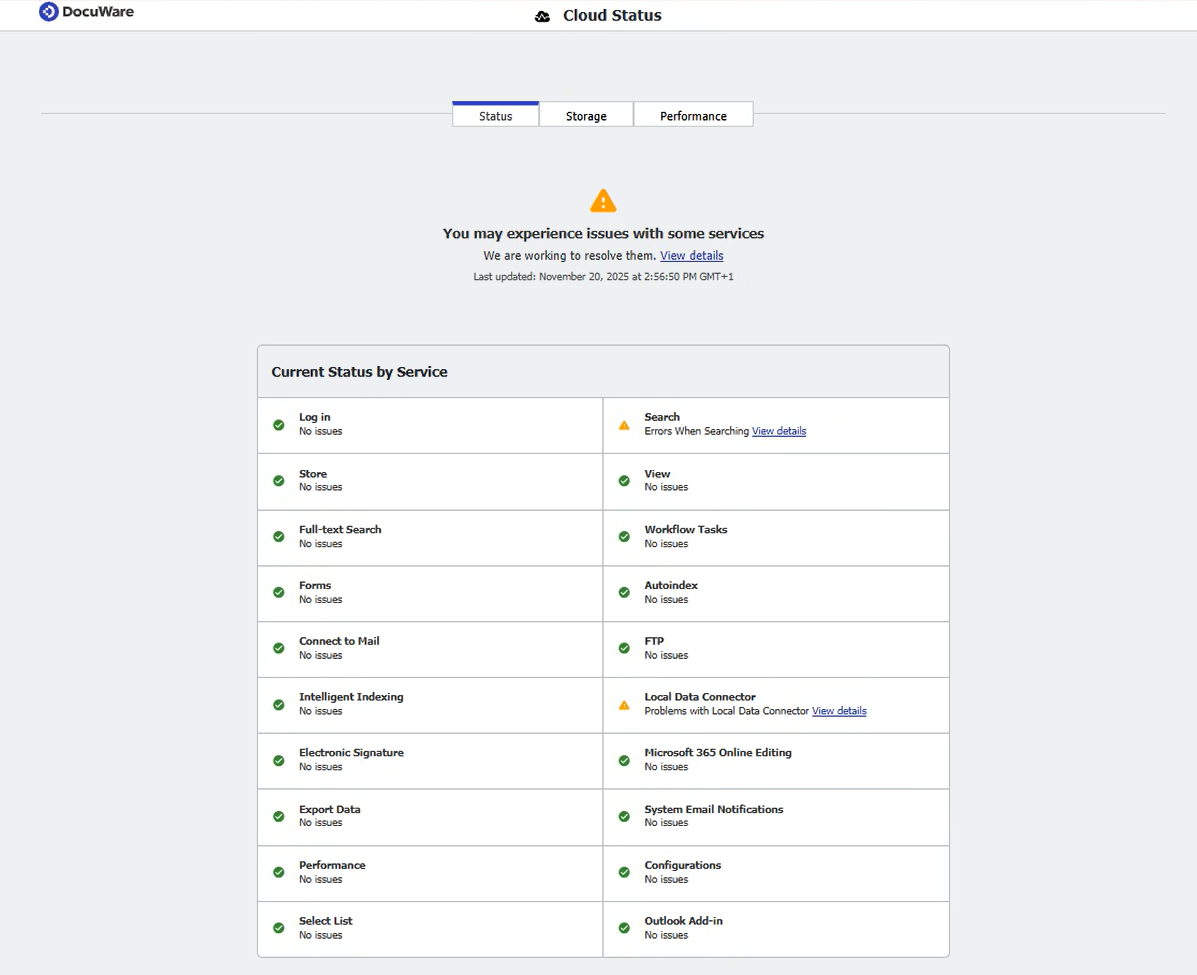
The redesigned status page reports the current state of the service and displays the progress for any active incident.
Applications
If DocuWare responds slowly, consult the status page to verify any active incidents, identify the affected components, and view the latest progress.
If DocuWare is unavailable, a single incident record is posted on the status page and kept up to date—from the initial note (“cause identified, fix in progress”) through to the final root-cause analysis.
Benefits
Regular progress updates during an incident
Final report with cause and resolution (RCA)
All information in one place—no need to search through emails
How to access
In the DocuWare Web Client, click the bell icon to open the status page:
The page lists all current incidents and events from the past seven days.
Refresh the page to view the latest progress notes during an incident.
When you create a support ticket, the portal automatically checks for a matching incident and links to it.
.png) The DocuWare Cloud status page now also displays incidents from the previous seven days for your reference.
The DocuWare Cloud status page now also displays incidents from the previous seven days for your reference.